
Hello dear friends, in this article I will address a fundamental topic for anyone interested in drawing manga or webtoons, which is how to add textures to manga and webtoons alike, or what is known in Arabic as “materials”, especially for clothing.
We know that manga artists rely heavily on adding tones to manga, as they add detail, depth, and realism to the drawing without the need for complex manual shading or consuming a lot of time.
Whether you are a beginner or a professional, these steps will help you improve the quality of your work, and I will give you all my experience in this field so that you can benefit from my own experiences in the field of manga drawing. As you know, I drew a manga consisting of six chapters, and it has been republished. So follow these steps with me using Clip Studio on the computer.
How to add tones to clothes using Clip Studio Paint
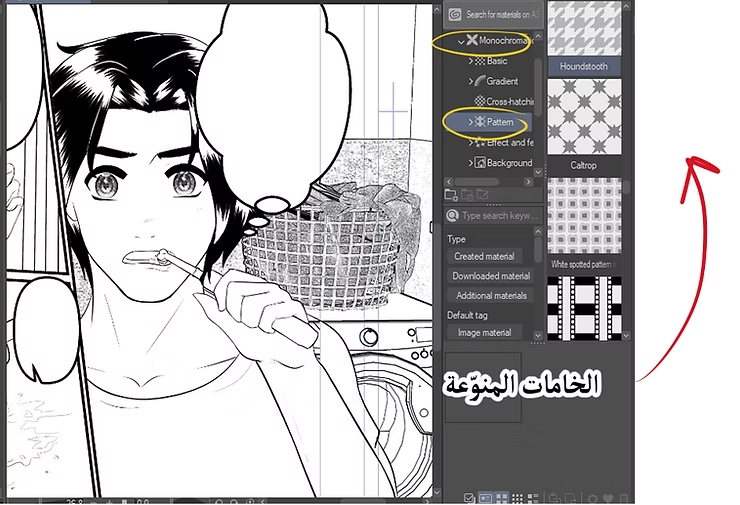
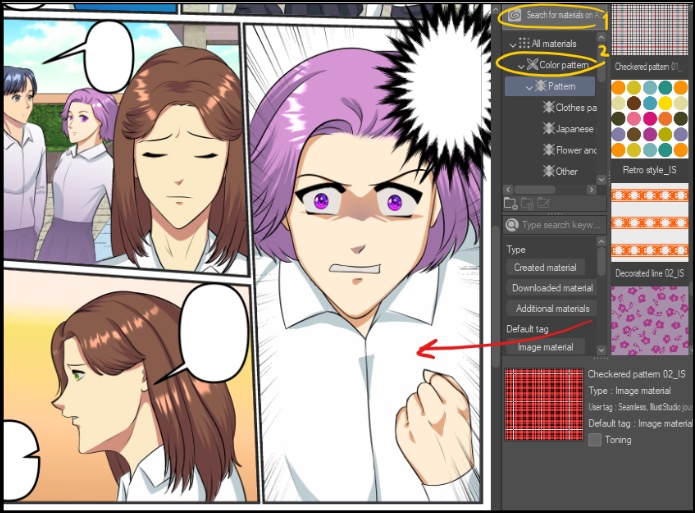
You can choose the appropriate tone from the library of ready-made materials available in the menu. Material > ToneThere you will find many ready-made tones that you can drag directly onto the work according to the style you want.
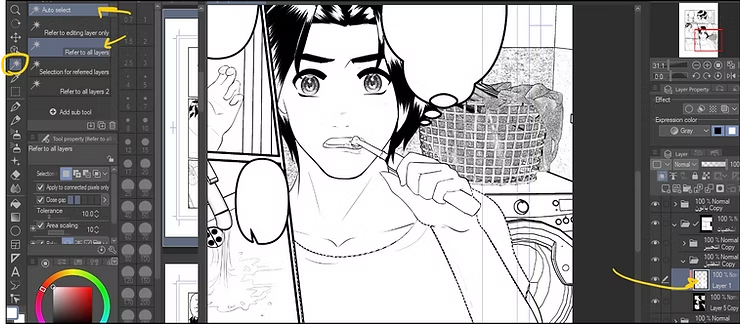
Next, we add a new layer on top of the previous layers and apply [the following] to it. Layer Mask To restrict the appearance of the tone to only the character or area to be colored, thus ensuring that the tone does not go beyond the boundaries of the drawing.
My online store has everything you need as artists
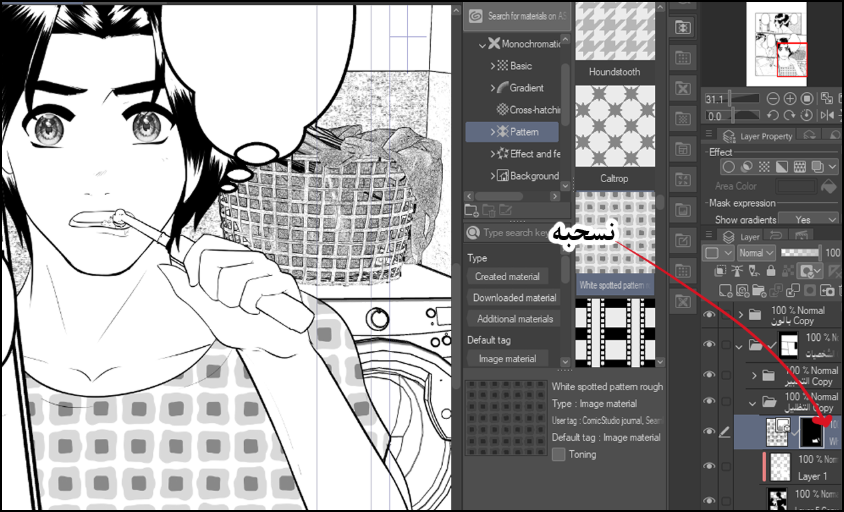
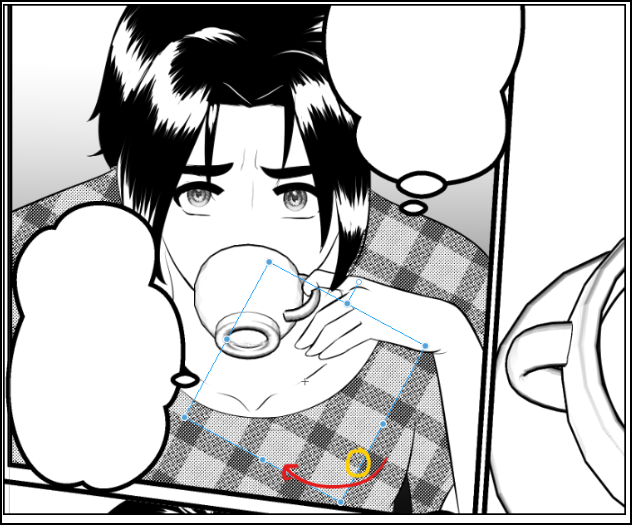
Then we drag the ton directly over the character or the selected part of the clothing using the tool Object Tool With the push and pull to position the tone, you can easily adjust the size and style of the tone to fine-tune the effect to your needs.
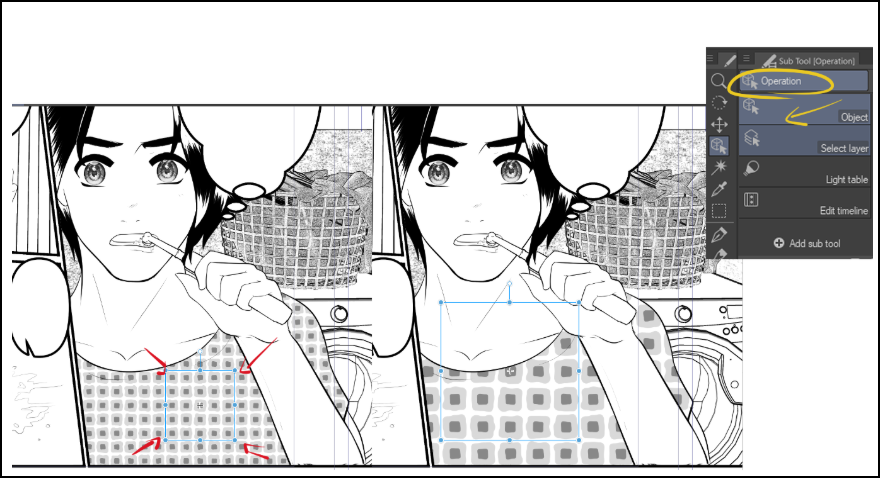
Using a tool Operation Tool (Edit Tool) After adding the tones to the manga, you can make them bigger or smaller through Enlarge or reduce the tones To fit the size of the area you want to cover.
After applying the tunic, use the mask button to apply a layer mask, so that you can wipe off excess parts outside the garment's boundaries.
If the tones are in color, you can simply convert them to black and white using the option Convert to Gray From the layer settings.
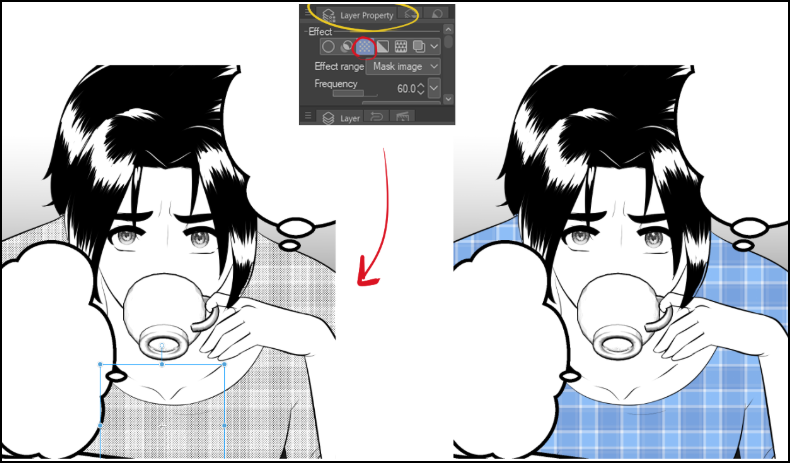
Another method: Use the Simple Tone Setting option
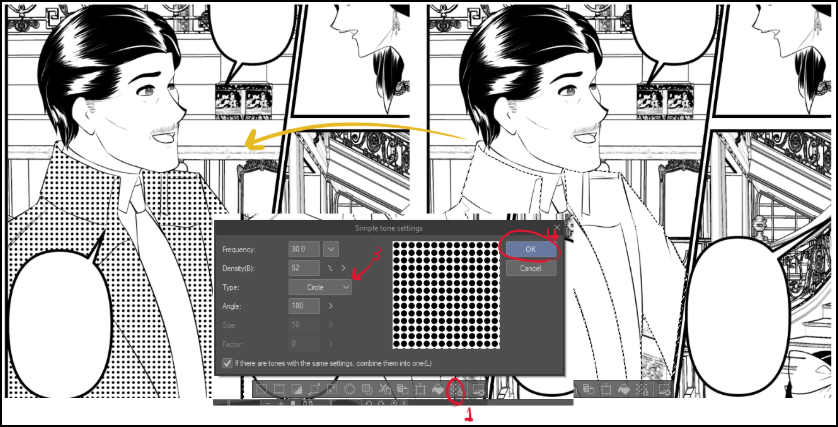
An alternative method is to decide on the outfit first, then follow these steps:
- Select the clothing layer or draw a selection manually using the selection tool.
- From the top menu, select Layer > Layer Property > Tone.
- In the settings, activate Simple Tone Setting.
- Choose the number of lines, dot size, or tone density as desired. This way, the color automatically converts to tones without needing to drag and drop files.
A third method: Using the Sub Tool with a spray brush
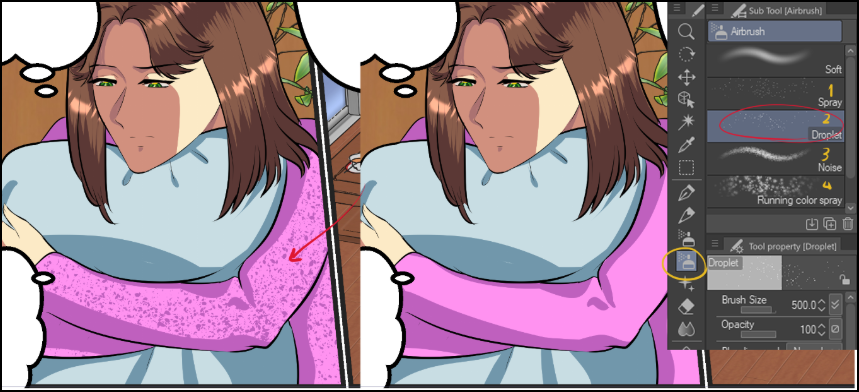
There is also a manual method, which is by using the Tones brush available in Clip Studio:
- Select the clothing layer.
- Choose a tool Sub Tool > Spray.
- You will find brushes with names like “Tone Spray” or “Dot Spray” that spray tones onto the selected area.
- By applying pressure to the pen or changing the brush settings, you can control the intensity and spread of the tones. This method is ideal for adding special effects or unconventional textures.
The importance of adding tones to manga lies in adding realism to clothing and giving detail to the drawings.
Tones, or textures, are not merely decorative; they play a crucial role in making clothing appear natural and convincing. By using tones, the artist can artistically depict the fabric's texture, folds, and creases. This enhances the scene's authenticity and increases the reader's engagement with the story.
The art of manga and maintaining consistency in the accurate drawing of manga characters.
Adding tones to manga gives you a visual way to highlight small details, such as fabric textures, leather, or backgrounds. Instead of relying entirely on manual shading, tones or textures provide a consistent level of detail, giving the page visual balance and reducing clutter.
And so today we learned the importance of adding tones to manga, and how they add realism and a distinctive artistic touch to our work, without consuming much time. As we know, the mangaka’s time is always limited, and we must take advantage of every second and try the easiest ways to shorten the effort of making webtoons, comics, and manga.
Using the appropriate tools in drawing programs such as Photoshop or Clip Studio to add tones to our manga and webtoons gives us the ability to add tones to clothes, hair, or even backgrounds, including home furnishings, to the end of which we get beautiful manga pages full of details that may suggest to the reader that we made an effort to draw them, while in reality all we did was use pre-made materials.
I hope you liked the article, and don't forget to try different methods and customize them according to your artistic style. I will see you in other posts, God willing.
May God bless you
A thousand thanks