Hello, today I will share with you some practical tricks that I use to quickly and effortlessly transform a 3D house into a cool anime background. It is a unique method that helps you to transform any 3D image or object into an anime drawing without the need for manual drawing or wasting a long time drawing backgrounds from scratch.
My Patreon account where you can find a detailed screenshot of the animation
As you know, anime and manga backgrounds are full of fine details that require a lot of time and effort to draw, and not many of us have enough time or ability to draw with such precision every day. So today I will explain to you how I can easily turn a house into a background to use in your anime and manga works. So let's start with the steps.
First step
First, when opening the program Clip Studio PaintWe insert the model we want, and today I chose a house that is included for free with the program's library to be a practical example in the lesson on converting a house into a background.
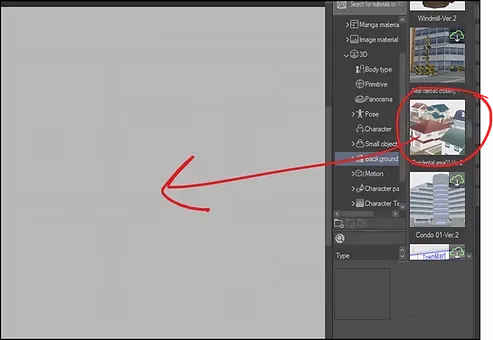
Next, we simply drag the model towards our drawing board within the project we are working on.
Step two
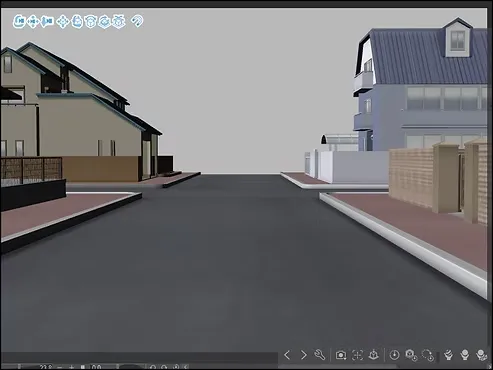
Here is the neighborhood that appears before us now, and it consists of several different houses that you can choose from. Just rotate the models using the moving tools until you find the right house.
We use [Object] Tool.
Step three
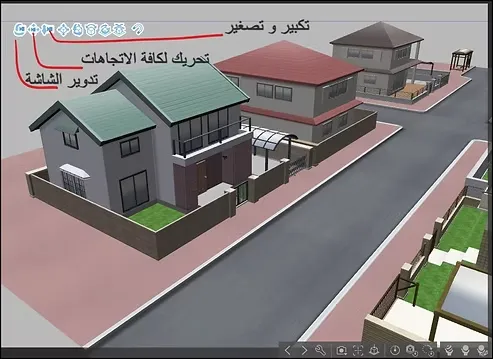
When we select the 3D element, Gizmo handles appear, allowing us to:
- Scale (Zoom in/Zoom out)
- Move (Movement)
- Rotate (Recycling)
From here, I selected this house after I toured the entire neighborhood using the options shown on the screen, and I colored it red for you so that it would be clear to you during the application.
Step four
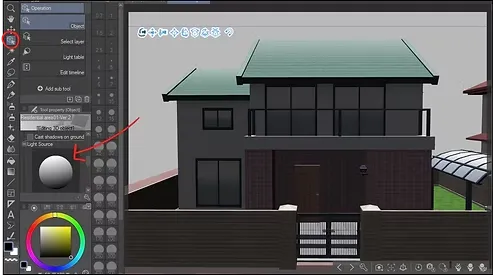
Now we zoom in on the house we selected to make it the foreground. As you can see, a shadow appears on the house, and we can easily control it using the option highlighted in red on the screen, called: [Tool Property] > Adjust shading
From there we can:
- Adjust the intensity of the shadows and the brightness.
- Enable/disable shadows.
- Controlling the direction of the light source.
Step five
I chose to have the house without a shadow here, because I wanted the scene to be in the morning with a soft light that gives a pleasant atmosphere to the drawing, so we are eliminating the shading.
You can keep the shade as it is, there is no harm in that.
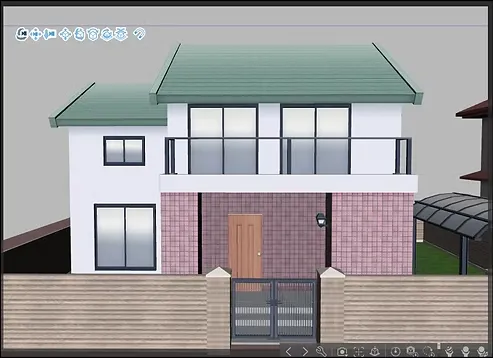
Step six
And now we come to the fun part of the lesson!
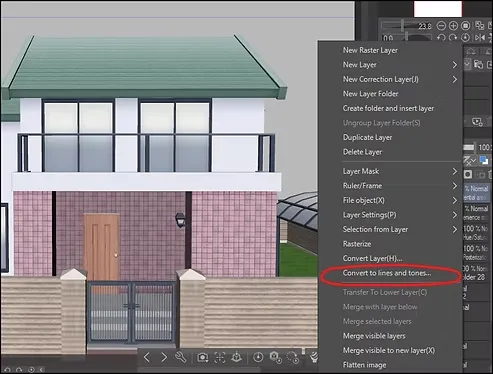
We click on the layer containing the house, then right-click, and then select the option shown in the following image: Convert to lines and tones
Settings
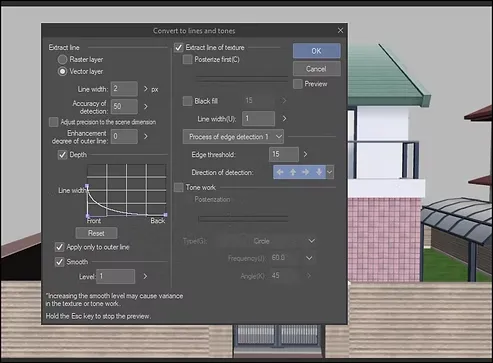
Next, the conversion settings will appear; you can leave them as they are or modify them.
Drawing an anime figure using a 3D doll
Step seven
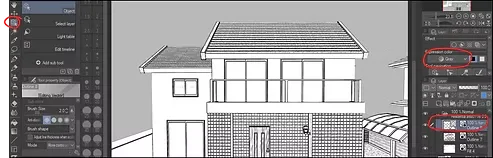
Thus, the house is transformed from a three-dimensional model into a drawing ready to be colored in seconds.
If the layer is on Monochrome And you want to convert it to Gray This is done through: Layer Property → Expression Color
You will be presented with 3 main options:
- Monochrome (Black and white)
- Color (colored)
- Gray (Gray gradient) This is what we choose
Step eight
Instead of coloring from scratch, we remove the white color that appears in the layer after transforming the house, and show the bottom layer of the 3D object underneath it.
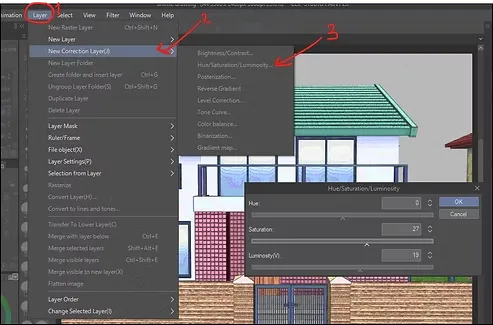
Next, we go to the following options to adjust the colors: Layer > New correction layer(J) > Hue/Saturation/Luminosity
This step enables us to keep the original color of the house while modifying it to resemble the anime style and making it ready for use.
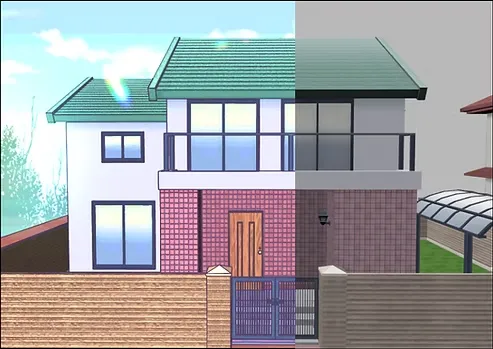
Final result
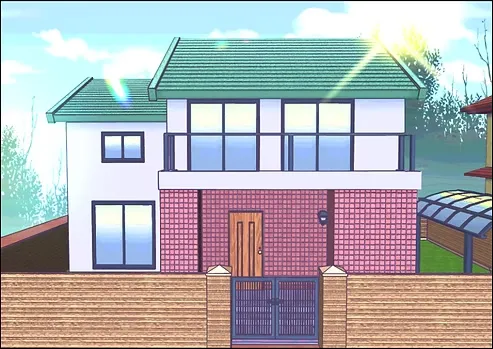
After you finish, you can add any visual effects such as glitter or sunlight, as I did here.
You can also add simple backgrounds such as the sky or trees.
And so the final result of the house drawing will be, ready for use in your projects quickly and efficiently. You can do the same thing on any other 3D model you need, whether it is rooms, streets or buildings, to turn it into an anime drawing in minutes.
This concludes the lesson on converting a 3D house into a perfect anime drawing, suitable for use in our anime and webtoons. Try and apply these steps precisely, and you will find satisfactory results. Now I leave you with the hope that we will meet in new lessons, God willing.